

Balancing Multiple Projects Without Burning Out: Time Management Tips for Project Managers

Updated: Feb 2
Managing Multiple Projects: A Practical Guide for Project Managers
=====================================================================
Managing multiple projects is not just “more work.” It involves more stakeholders, more decision points, more updates, and more mental switching—often without extra time.
If you are constantly busy but still feel behind, it is not a personal failure. It is a system problem.
This guide provides a practical framework for balancing multiple projects with more clarity and less stress. It also includes a quick reset checklist for those days when everything feels urgent.
When you’re ready to apply this to your real workload, you can book support directly here:
1) Build a “Portfolio Cockpit”
A portfolio cockpit is a single view that tells you, at a glance, the next milestone per project, the number one risk or blocker, decisions needed this week, and your next action.
This approach reduces mental load. It also speeds up stakeholder conversations. You won’t need to reconstruct status from memory.
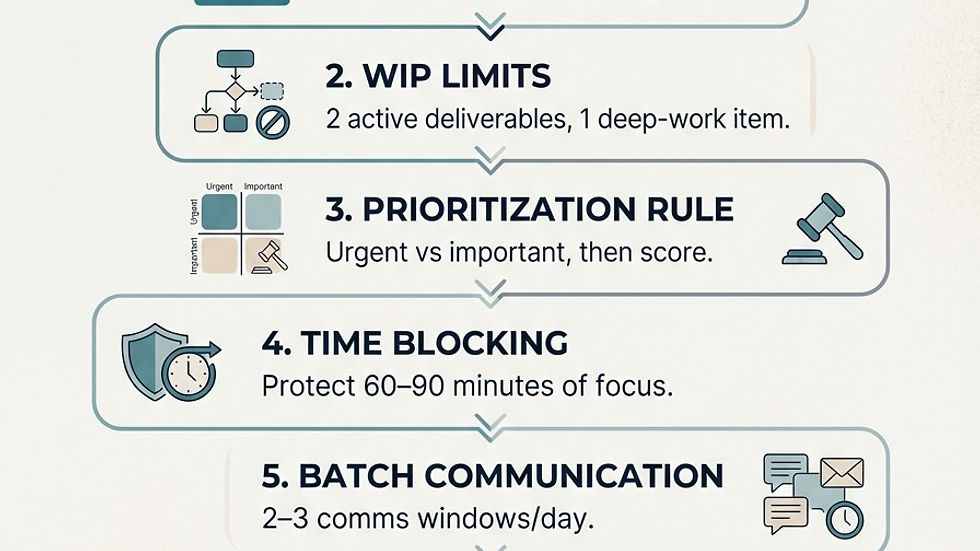
2) Set WIP Limits
When you’re spread across projects, it’s easy to have everything “in progress” and nothing truly done.
Work-in-progress (WIP) limits help you reduce overload and improve flow. According to Atlassian, effective WIP limits can reduce cycle time.
A realistic personal WIP limit could be:
2 active deliverables (the things you’re truly pushing forward today)
1 deep-work item (planning, analysis, writing, risk work)
Everything else goes into “Next.”
3) Use a Prioritisation Rule You Can Explain
If priorities change every hour, your day will too.
Choose a consistent method for sorting work. This way, you won’t be re-deciding all day.
Two simple options include:
The Eisenhower Matrix (Urgent vs Important) to avoid the urgency trap.
A lightweight scoring approach (impact/effort/urgency) for complex trade-offs. Atlassian outlines common prioritisation frameworks you can adapt.
A phrase that saves time and reduces politics is:
“I can move this up—what should drop or shift as a result?”
4) Time-Block Your Calendar
If your calendar is only filled with meetings, delivery becomes “whatever fits in the gaps.”
Time blocking protects execution time. This ensures important work doesn’t get squeezed out. Atlassian shares how time blocking creates space for work that otherwise gets pushed aside.
Try this structure:
60–90 minutes focus block (non-negotiable)
2–3 communication windows
30–60 minutes buffer for fires and escalations
5) Batch Communication
Context switching is a hidden productivity drain. Jumping between projects, tools, and threads all day makes everything take longer.
Atlassian explains how context switching harms productivity and increases stress.
A simple fix is to set 2–3 communication windows per day. Keep a “parking lot” note for interruptions so you don’t lose your train of thought.
6) Make Meetings Decision-First
Many meetings exist because decisions, ownership, or next steps aren’t clear.
Reduce meetings where you can. When you do meet, make them decision-focused:
Status updates should be asynchronous when possible.
Use meetings for decisions, risks, trade-offs, and escalations.
End with an owner and due date.
This approach reduces the “meeting-to-meeting pinball” that kills focus.
7) Protect Your Energy
If your system depends on you being “on” all day, it will eventually break.
Protecting energy is part of delivery.
Here are some practical steps:
Add buffer time every day.
Schedule a weekly reset (portfolio cockpit, WIP, and priorities).
Stop overcommitting to “quick” work that isn’t truly a priority.
Multi-Project Reset Checklist (10 Minutes)
Use this checklist when your day feels chaotic and you need control fast.

Ready to Apply This to Your Real Workload?
If you want support turning multi-project overload into a clear plan and stronger stakeholder communication, book a session here:


Comments